Bible Color - Color By Number
Fun Coloring WorldBoard
4.81.32K Reviews
- Version
- 1.94.214
- Installs
- 1.00M
- Age Rating
- Everyone
Screenshots
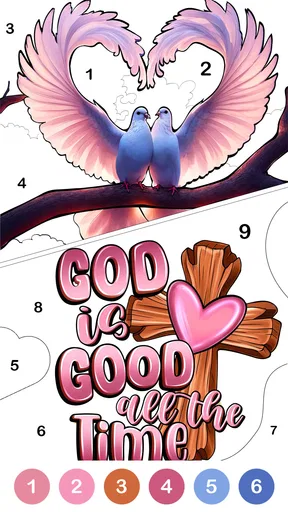
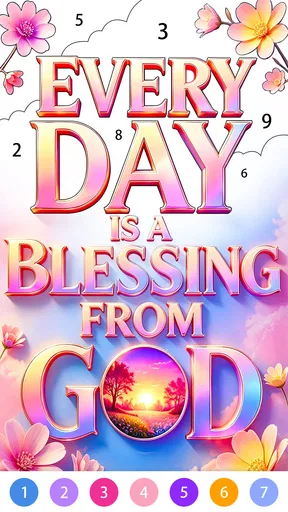
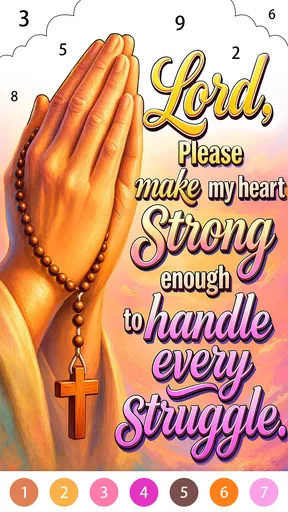
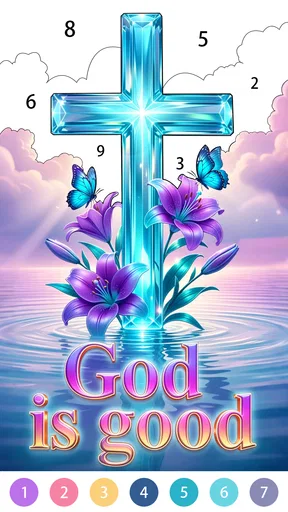
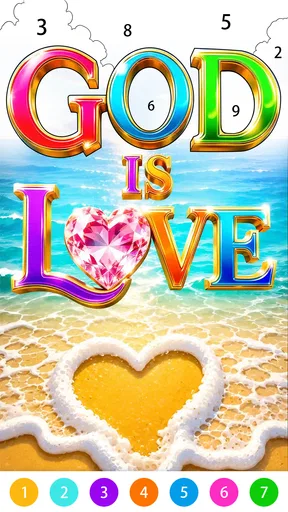

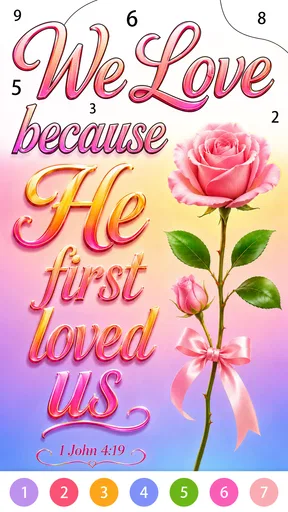
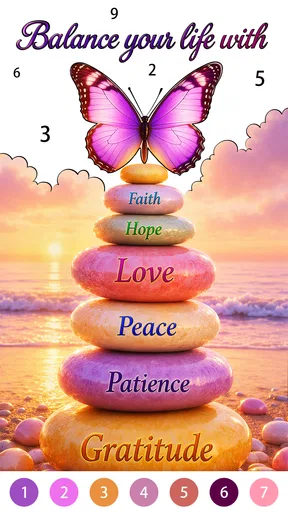
Our Review of Bible Color - Color By Number
 Analysis by Appyee
I found Bible Color - Color By Number to be a quiet, uncomplicated coloring game aimed at people who want a slower activity rather than a demanding challenge. Its Bible-themed artwork gives it a clear identity, but the main appeal is the rhythm of filling numbered sections and watching an image gradually come together. I can see why it works as a short evening distraction: there is very little to learn, and the gentle pace makes it easy to start without preparing anything.
It is a free board game from Fun Coloring World, available for Everyone and compatible with Android 7.0 or later. The app has built a strong audience, with a 4.8 average from around 16 thousand ratings and over 1 million installs. Those figures do not replace personal experience, but they do suggest that the simple format has connected with many people.
How the current coloring experience feels
The basic loop is familiar: choose an illustration, select a color or numbered area, and fill the matching spaces. That simplicity is the point. I never felt pressured to memorize rules, beat a timer, or compete with another player. Instead, the game turns a picture into a series of small tasks, which can be satisfying when I want something to occupy my hands while keeping my attention calm.
The Bible focus also changes the mood compared with a general coloring book. The subject matter gives the artwork a devotional and reflective character, so the game will make more sense to users who are comfortable with religious imagery. Someone looking only for animals, landscapes, abstract patterns, or modern illustrations may find the selection less relevant than what is offered by a broad coloring app.
What I appreciate most is the low entry cost. Bible Color is free to download and play, so I can try the experience before deciding whether it deserves a place on my phone. The trade-off is that optional purchases range from about two dollars to nearly sixty dollars per item. That is a wide span, and it makes it important to pay attention before confirming a purchase, especially if a younger family member uses the device.
A useful game for short, repeatable breaks
This is not the kind of board game I open when I want strategy, competition, or a clear win condition. It is closer to a digital coloring book with a numbered structure. I would use it during a short break, while waiting for an appointment, or before bed when a puzzle game feels too stimulating. A single picture can provide a sense of progress without asking me to commit to a long session.
A realistic routine would be to open it after dinner, complete a few sections of one illustration, and stop when I feel ready. Because the activity is divided into small areas, I do not have to finish an entire image in one sitting. That makes it more practical than a traditional coloring project for someone who does not want to keep paper, pencils, and an unfinished page on a table.
There is also a useful attention trick here: rather than trying to view the whole image at once, I can work color by color or section by section. This reduces the visual clutter of a partly completed picture. It is a small change in approach, but it makes the experience feel more orderly and helps when several tiny areas are close together.
Where the numbered format helps and where it gets in the way
Color-by-number removes much of the uncertainty found in freehand coloring. I do not need to decide whether a robe should be blue or brown, or whether a background needs a particular palette. For a beginner, that guidance is welcoming. It also means the finished result usually feels more polished than something I might create without artistic confidence.
At the same time, the guidance limits creative control. I am following the structure of the picture rather than making my own artistic choices. Users who enjoy experimenting with unusual colors, shading, or composition may quickly want a more open-ended coloring application. Bible Color is better for completion and relaxation than for personal artistic expression.
The smallest numbered sections can also require patience. On a phone, tapping a narrow area accurately is less comfortable than working on a larger tablet screen. I found that zooming in and moving slowly is preferable to repeatedly tapping around a tiny shape. This is one of the practical differences between a relaxing session and a frustrating one: the game is easy conceptually, but detailed images can still demand careful finger placement.
What the developer’s current version tells me
The current version is 1.94.214, and the app was released on January 8, 2021. That combination suggests a product that has had time to mature rather than a brand-new experiment. I would expect an established basic workflow from an app with this history, and the large installed audience supports that impression.
Still, a version number alone does not tell me that every part of the experience has changed recently or that the app will suit every device equally. I treat it as evidence that the project is active enough to have moved through many revisions, not as a promise of a particular feature. If you already use an older installation, the sensible approach is to update normally and check whether the current interface feels comfortable before investing in optional content.
For new users, the practical benefit is that the app is not tied to a recent Android release. Support for Android 7.0 or later makes it accessible to people using older phones, although performance can still vary depending on the device and the complexity of an illustration. I would avoid judging it solely on a modern flagship if the intended user has an older handset.
How existing users may experience updates
For someone who has been using the game for a while, the most important question is not the version number but whether familiar progress and habits remain easy to manage after updating. I would approach an update with the same care I use for any coloring app: finish or note the pictures I am working on, make sure the device has enough free space, and reopen the game afterward to confirm that the current work still feels accessible.
The established nature of the app is reassuring for people who want a dependable pastime, but it can also create expectations. Long-term users may want a constantly refreshed selection, smoother handling of very small sections, or clearer separation between freely available material and paid additions. Those are reasonable areas to watch, even though they should not be treated as confirmed changes unless the app itself clearly presents them.
New users should not assume that a high rating means the experience is completely frictionless. Ratings often reflect the central idea, and the central idea here is pleasant and easy to understand. They do not guarantee that every illustration will match your taste, that every tap will register perfectly, or that the purchase structure will feel comfortable. I would judge those details during the first few sessions.
Three ways to get more from the app
My first tip is to use it as a stopping-point activity rather than an endless feed. Pick one illustration and decide in advance whether you will complete a color, a section, or a small portion of the image. This prevents the relaxing format from turning into passive scrolling and gives each session a clear finish.
Second, work from the largest areas toward the smallest ones. Large sections reveal the picture quickly and make the remaining details easier to understand. When I leave all the tiny spaces until the end, the final stage feels more precise and less visually confusing. This workflow is especially useful on a smaller screen.
Third, consider who will be using the device before enabling purchases. Since individual in-app items can cost from roughly two dollars to almost sixty dollars, I would not hand the phone to a child without appropriate purchase controls. The Everyone age rating describes the content audience, but it does not mean every purchase decision should be left unsupervised.
A fourth useful approach is to treat the religious theme as part of the selection process, not as a minor decoration. If you want a neutral coloring library, this may not be the right match. If you appreciate Bible-related scenes and want the coloring activity to feel reflective, the theme is a genuine advantage rather than a limitation.
Who should choose it, and who should skip it
I would recommend it to adults who enjoy calm, guided coloring; families looking for an accessible activity with an Everyone rating; and users who prefer completing structured images instead of inventing their own designs. It may also suit someone who wants a devotional atmosphere without opening a more demanding study or reading app. The game does not require the kind of concentration associated with strategy board games, which makes it approachable after a tiring day.
I would be more cautious about recommending it to competitive players. There is no reason to choose this title if your main goal is tactical decision-making, multiplayer interaction, or a strong sense of challenge. A conventional board game app will provide more meaningful choices, while a puzzle game will usually offer clearer obstacles and problem-solving.
Creative users should also compare it with a free-form coloring tool. Those alternatives are better when you want to select every color, add your own style, or work with blank pages. Bible Color’s strength is removing those decisions and giving me a guided path to a finished image. That is relaxing for one person and restrictive for another.
Remaining gaps and everyday friction
The biggest limitation is the narrowness of the concept. The Bible theme gives the app personality, but it also sets a boundary around the audience. Even a well-made coloring system cannot overcome that if the artwork does not interest you. I would not download it solely because it is popular; I would download it because the subject and the slow, guided format fit what I want.
The purchase range is another point that deserves attention. Free access makes experimentation easy, but the presence of higher-priced individual items means the overall experience may feel different depending on how much content you want. Someone satisfied with occasional free coloring can keep costs low, while a frequent user may be tempted to spend more over time. That is not automatically a flaw, but it is a real trade-off.
There is also a difference between emotional relaxation and technical ease. The concept is gentle, yet detailed pictures can still involve repeated tapping and zooming. Users with limited dexterity or visual strain may prefer a larger display or a coloring app with simpler artwork. I would test a detailed image before deciding whether extended sessions are comfortable.
What I would watch as the app continues
For future use, I would pay attention to how the current version handles the balance between accessible free content and optional purchases. I would also watch whether the app continues to feel straightforward for returning users, especially as the illustration library and interface evolve. A coloring game benefits from consistency: people come back because the routine is familiar, not because they want to relearn the controls.
I would also look for improvements that reduce small-screen friction, such as clearer feedback when a narrow section is selected or more comfortable navigation through detailed artwork. These are the kinds of changes that can make a quiet game genuinely easier to use without changing its identity. They are worth watching as possibilities, not claims about what the developer has already added.
Fun Coloring World has created a focused experience rather than a broad art platform. That focus is why it feels approachable, and it is also why the choice will depend heavily on personal taste. The current release is a sensible starting point for anyone interested in Bible-themed coloring and a relaxed board-game format, particularly on an older Android device that still meets the minimum requirement.
My final view is positive but specific: this is best understood as a guided coloring retreat, not a conventional board game or a full creative studio. I like it for short, quiet sessions, and I think its clear structure makes it friendly to beginners. I would skip it if I wanted competition, unrestricted design, or a neutral collection of subjects. For the right user, though, the free entry, reflective theme, and easy-to-repeat routine make it a worthwhile app to try.
Verdict
Strengths of Bible Color - Color By Number
- Relaxing coloring sessions suitable for short breaks
- Simple controls make it accessible for beginners
- Large variety of Bible-themed artwork
- Works well as a calming, offline-friendly activity
- Color palettes help create polished-looking results
Limitations of Bible Color - Color By Number
- Some artwork and features may require in-app purchases
- Frequent ads can interrupt the coloring experience
- Small details may be difficult to color on phone screens
- Limited creative freedom compared with blank-canvas apps
- Progress may not transfer easily between devices
Other Releases by Fun Coloring World
View All
Graffiti Quote Color by number
Board4.8

Fluid Art:Color By Number
Board4.8
Similar Picks in This Category
View All
Ludo King®
Gametion4.1

Ludo
Yarsa Games4.6

Tile Master® - Matching Game
Higgs Studio3.6

Checkers Online
CC Games4.6

Dominoes
Loop Games4.7

Chess
Chess Prince4.6
Frequently Asked Questions
What is Bible Color - Color By Number?
Bible Color - Color By Number is a relaxing coloring app inspired by biblical stories, characters, symbols, and inspirational verses. It combines traditional coloring-book activities with a paint-by-number system, allowing you to complete illustrations by matching colors to numbered sections. The app is designed for casual entertainment, creative expression, and quiet moments of reflection, whether you are familiar with the Bible or simply enjoy themed coloring games.
How does the coloring system work?
Each picture is divided into numbered areas, and every number corresponds to a specific color. You select a color from the palette and tap the matching sections to fill them in. The controls are generally simple, with zooming and navigation helping you reach smaller details. This makes the app accessible to beginners, while the more intricate illustrations can still provide a satisfying challenge for users who enjoy completing detailed artwork.
Does Bible Color - Color By Number require an internet connection?
Some parts of the app may work offline once content has been loaded, but an internet connection can be necessary for downloading new artwork, synchronizing progress, displaying advertisements, or accessing online features. Availability may also depend on the version installed and the device being used. If you plan to color while traveling or without mobile data, it is best to open the app beforehand and check which pictures are available offline.
Is Bible Color - Color By Number free to download and use?
The app can generally be downloaded at no initial cost, but free access may include advertisements, limited picture collections, or optional in-app purchases. Premium content may unlock additional illustrations, remove advertising, or provide other conveniences. Before downloading, review the current store listing and purchase details, since pricing, subscriptions, trial periods, and available features can change between Android and iOS versions.
Is the app suitable for children and all age groups?
Bible Color - Color By Number is easy to understand and can be enjoyable for children, teenagers, and adults who like coloring activities. However, parents should check the app-store age rating, advertising settings, privacy information, and any in-app purchase options before allowing younger children to use it. Some pictures or themes may be more appropriate for certain ages, and parental controls can help prevent accidental purchases.
Play our best games!


